EN
EN
 AR
AR
 BG
BG
 HR
HR
 CS
CS
 DA
DA
 NL
NL
 FI
FI
 FR
FR
 DE
DE
 EL
EL
 HI
HI
 IT
IT
 JA
JA
 KO
KO
 NO
NO
 PL
PL
 PT
PT
 RO
RO
 RU
RU
 ES
ES
 SV
SV
 CA
CA
 TL
TL
 IW
IW
 ID
ID
 LV
LV
 LT
LT
 SR
SR
 SK
SK
 SL
SL
 UK
UK
 VI
VI
 ET
ET
 HU
HU
 TH
TH
 FA
FA
 MS
MS
 HY
HY
 AZ
AZ




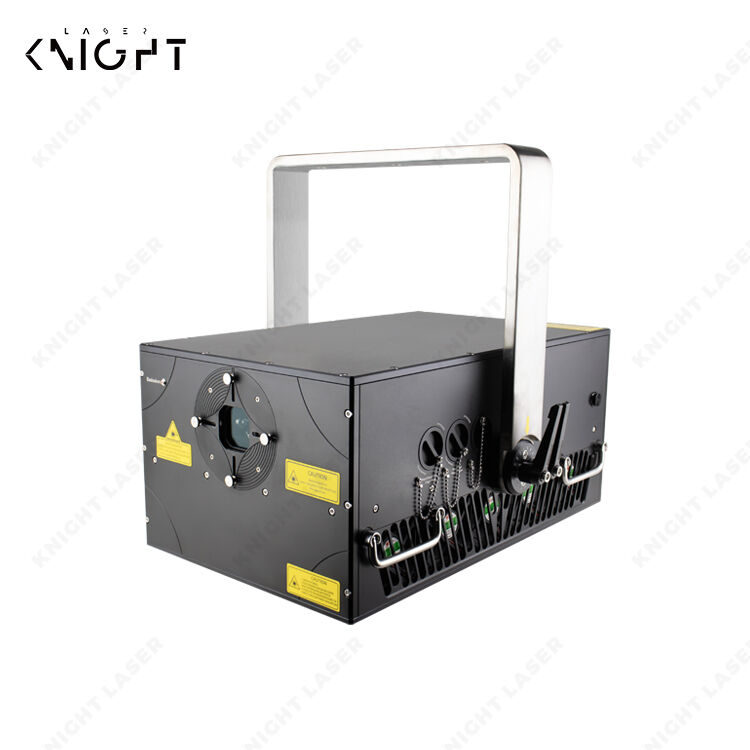
Laser lights are amazing tools that can do many things, from cutting materials to marking surfaces. However, one common problem that people face when using a 15 Watt laser light is overheating. When your laser light gets too hot, it can stop working or even get damaged. Knowing how to troubleshoot these overheating issues is important to keep your laser running smoothly. At Knight Laser, we understand the importance of keeping your equipment in great shape, and we want to help you solve any heating problems you might have with your 15 Watt laser light.
How to Identify Common Overheating Issues in Laser Light Applications
One of the first steps to solving overheating problems is knowing the signs. If your laser light starts to flicker or is not as bright as it used to be, this might be a sign of overheating. Another thing to watch for is strange noises coming from the machine. If you hear buzzing or clicking sounds, it could mean the laser is struggling to work properly. Also, feel the casing of the laser. If it’s hot to the touch, something might be wrong. It’s crucial to check the ventilation too. If the vents are blocked, hot air cannot escape, leading to overheating. Regular maintenance can help you spot these issues before they become serious. Make sure to clean the air filters and vents often. You can also use a thermometer to check the temperature of the laser. If it is running hotter than normal, it’s time to take action. Heat sinks are parts that help cool down the laser. If they are not working well, that can cause the laser to heat up quickly. Always ensure they are in good condition. Keeping an eye on these signs can help you catch problems early and save you from bigger issues down the line.
What to Look for When Diagnosing Overheating in Laser Lights
When diagnosing overheating in your laser light, it’s essential to look closely at a few key areas. First, check the power supply. If the voltage is too high, it can cause your laser to overheat. You might need a multimeter to measure the voltage and ensure it’s within the right range. Next, inspect the cooling system. Make sure the fans are running properly. If a fan is broken or not spinning, it won't cool the laser effectively. Sometimes, the cooling fluid can get low or dirty, which can lead to overheating. Ensure the fluid levels are adequate and clean. Also, review the materials you are cutting or marking. Some materials generate more heat than others. If you are working with thicker materials, you might need to adjust the settings on your laser. Slower speeds or lower power settings can help reduce overheating. Lastly, consider the environment where you are using the laser. If it’s in a hot room with little airflow, that can cause the machine to heat up faster. Make sure the laser is in a well-ventilated area. By looking at these factors, you can better diagnose and fix overheating issues, keeping your Knight Laser equipment in great working order.
How to Prevent Overheating in 15 Watt Laser Lights for Optimal Performance
Overheating is a common problem with 15-watt laser lights. When the light gets too hot, it can stop working properly. To keep your laser light performing well, you need to prevent it from overheating. First, make sure your laser light has enough space to breathe. If it is too close to walls or other objects, the heat cannot escape. A good rule is to keep at least a few inches of space around the light. This allows cool air to flow in and keeps the laser cooler.
Another way to prevent overheating is to use your laser light for shorter periods. If you run it for a long time without a break, it can get very hot. Try using it for 15 to 20 minutes, then give it a short break. This break lets the light cool down before you use it again. You should also check the room temperature where the laser light is being used. If the room is too hot, it can make the laser light heat up faster. Keeping the room cooler helps the laser light stay at a safe temperature.
Cleaning your outdoor party laser lights is another important step. Dust and dirt can build up on the vents. When this happens, air cannot flow properly, and the light can overheat. Make sure to clean the vents regularly with a soft cloth. You can also use a small brush to remove any dirt that gets stuck. Lastly, check that the power supply is working well. Sometimes, a faulty power supply can cause the laser light to overheat. If the light flickers or makes strange noises, it might be time to get it checked. By following these simple tips, you can help prevent overheating and keep your Knight Laser light working great.
How to Enhance Efficiency and Reduce Overheating in Laser Lights
To make your 15-watt laser light work better and cooler, there are several steps you can take. First, you want to ensure you are using the right settings for your tasks. If you are using the laser light for cutting or engraving, you should adjust the power settings according to the material you are working with. Using too much power can cause the light to overheat. For example, if you are cutting wood, you might not need the full 15 watts. Lowering the power can help reduce heat and still give you a good result.
Another way to enhance efficiency is to use a cooling fan. A small fan can blow cool air over the laser light. This helps keep it cool while you are working. If you have a fan, make sure it is pointing in the right direction so that it blows air directly onto the light. You can also think about using a water cooling system. This system circulates water around the laser light, helping to keep it cool. While setting this up might take some extra work, it can make a big difference in performance.
It is also essential to use the right lens for your laser light. Different lenses can change how the light works and how hot it gets. Make sure you choose a lens that is suitable for your specific job. If you are unsure, check the instructions that came with your Knight Laser light or ask someone who knows about lasers. Finally, always keep an eye on the temperature of your laser light while using it. If it starts to feel too hot, stop using it and give it a break. This will help you avoid overheating and keep your laser light working efficiently.
What Are the Best Practices to Avoid Overheating in 15 Watt Laser Lights?
Using your 15-watt laser light safely and effectively is crucial for its lifespan and performance. One of the best practices to avoid overheating is to always use it in a well-ventilated area. Good airflow is essential. If the room feels stuffy or cramped, try opening windows or using a fan to help circulate the air. This simple step can make a big difference in keeping your laser light cool and functioning well.
Another best practice is to regularly check and maintain your laser light. Keep an eye on the connections and make sure everything is secure. Loose connections can cause extra heat. It is also a good idea to periodically inspect the power supply and replace it if it shows signs of wear. Doing this can help prevent overheating caused by electrical problems. For the best results, follow the manufacturer’s guidelines for maintenance and care.
Additionally, be mindful of how long you are using your laser light. If you know you will be working for a long time, plan to take breaks. These breaks help the mini laser light cool off and prevent it from overheating. As mentioned earlier, using the light for 15 to 20 minutes at a time with short breaks is a good practice. Lastly, consider keeping a temperature gauge near your laser light. This device can help you monitor the heat and warn you if it gets too hot. When you notice a rise in temperature, take action immediately. By following these best practices, you can enjoy using your Knight Laser light while keeping it safe and effective.
Table of Contents
- How to Identify Common Overheating Issues in Laser Light Applications
- What to Look for When Diagnosing Overheating in Laser Lights
- How to Prevent Overheating in 15 Watt Laser Lights for Optimal Performance
- How to Enhance Efficiency and Reduce Overheating in Laser Lights
- What Are the Best Practices to Avoid Overheating in 15 Watt Laser Lights?